
Let your Workflow journeys talk to your own systems: look up live data part-way through a journey, and receive SMS replies and delivery receipts as they happen.
A Remote Query action in a Workflow journey calls your server. We POST JSON to your URL with HTTP Basic authentication, and your server replies with JSON containing "status": "SUCCESS" or "FAILURE", plus any values the journey needs.
Use it to:
- Look up data: fetch a customer’s current balance before sending a payment reminder, or check whether they’ve already paid before making a follow-up call.
- Receive SMS replies: get each reply to a journey’s SMS in your own system (
sms.inbox). - Receive delivery receipts: know when each journey SMS was delivered or failed (
sms.delivery).
This is separate from submitting records to Workflow, where you call us.
Setting up
Each Remote Query is an action in the journey, set up in the Workflow designer:
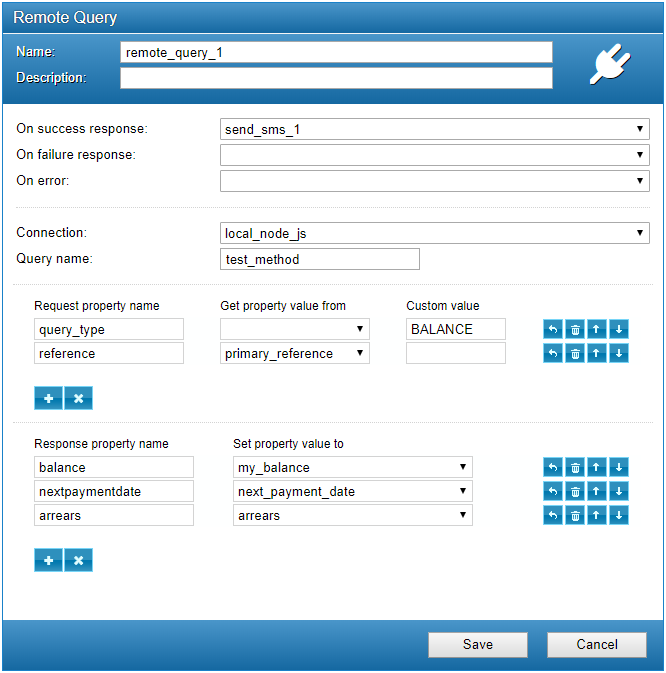
| Setting | What it does |
|---|---|
| Connection | Your server: its URL plus the key and secret we send with every call. Set up once, used by any number of actions. |
| Query name | Added to the end of the connection URL, so your server knows which query is being asked, for example custom.query. |
| Request property | Each line adds a field to the JSON we send. Its value comes from the record (such as primary_reference) or is a fixed value (such as BALANCE). |
| Response property | Each line copies a field from your reply into a journey variable, so later actions can use it, for example in the text of an SMS. |
| On success / failure / error | The next action in the journey when your server replies SUCCESS, replies FAILURE, or can’t be reached. |
Requests
https://your-server.example.com/remote.query/<query name>- The body is JSON and always includes a
request_id. Return the samerequest_idin your reply. - We authenticate with HTTP Basic, using the key and secret in the connection settings. Reject any request where they don’t match.
- Reply with HTTP 200 and a JSON body, quickly: the journey waits for your answer.
- Use HTTPS, and return 404 for any query name you don’t recognise.
Custom lookups
The fields sent are the request properties you set up in the action. With the settings shown above, a lookup looks like this:
Request
{
  "request_id": "8f2c41d7",
  "query_type": "BALANCE",
  "reference": "CUST-1042"
}
Reply: success
{
  "request_id": "8f2c41d7",
  "status": "SUCCESS",
  "balance": 240.78,
  "arrears": 36.0,
  "nextpaymentdate": "2026-11-28"
}
Reply: failure
{
  "request_id": "8f2c41d7",
  "status": "FAILURE",
  "statusMessage": "Account not found"
}
The journey copies balance, nextpaymentdate and arrears into its variables (my_balance, next_payment_date and arrears), then moves on to the success action, here an SMS quoting the balance.
Inbound SMS
Query name sms.inbox: a reply to one of the journey’s SMS.
{
  "request_id": "8f2c41d8",
  "messageid": 31104,
  "from": "07700900123",
  "to": "15551",
  "body": "Yes, please call me",
  "date": "2026-10-11T10:25:43.511Z",
  "reference": "CUST-1042"
}| Field | Type | Description |
|---|---|---|
messageid | integer | Our id for the incoming message. |
from | string | The mobile number that sent it. |
to | string | The number or short code it was sent to. |
body | string | The message text. |
date | string | When it was received, ISO 8601 in UTC. |
reference | string | The reference of the record it relates to. |
Delivery receipts
Query name sms.delivery: the delivery result for an SMS sent by the journey.
{
  "request_id": "8f2c41d9",
  "messageid": 160714,
  "date": "2026-10-11T10:25:43.511Z",
  "status": 2,
  "code": 4
}| Field | Type | Description |
|---|---|---|
messageid | integer | Our id for the SMS that was sent. |
date | string | When the network reported the result, ISO 8601 in UTC. |
status | integer | 2 delivered, 1 pending, -1 failed. |
code | integer | The detailed result code. See below. |
Delivery codes
| Code | Meaning |
|---|---|
| 0 | Submitted, no errors |
| 4 | Delivered, no errors |
| 5 | Failed, unknown reason |
| 6 | Submitted, final status unknown |
| 8 | Expired by the network |
| 20 | Permanent failure: number not valid |
| 21 | Premium SMS credit issue |
| 23 | Absent subscriber, permanent: number not known |
| 24 | Absent subscriber, temporary: message expired |
| 25 | Operator failure |
| 26 | Phone error, for example SIM or memory full, or busy |
| 27 | Permanent phone error |
| 28 | Rejected as spam by the operator |
| 29 | Content not permitted |
| 1025 | Number blacklisted |
| 1026 | Client blacklisted |
| 1027 | Prefix blacklisted |
| 1028 | Account error |
| 1030 | Destination busy |
| 1032 | Syntax error |
| 1053 | Number unroutable |
| 1061 | Number blocked from using SMS |
| 1063 | Sequence error |
| 1068 | Message routing error |
Your reply
| Field | Type | Description |
|---|---|---|
request_id required | string | The request_id from the request. |
status required | string | SUCCESS or FAILURE. Decides which action the journey runs next. |
statusMessage | string | Required when status is FAILURE: the reason, for your reports. |
any other field | any | For custom lookups, the values to copy into journey variables, named as in the action’s response properties. |
Code examples
Each example handles all three query types at /remote.query/<query name>, so set your connection URL to https://your-server.example.com/remote.query. They check the key and secret from the connection settings: RemoteQuery:Key and RemoteQuery:Secret in C#, and EM_RQ_KEY and EM_RQ_SECRET in Python and Node.js. The C# example is an ASP.NET Core minimal API (dotnet new web); Python needs pip install fastapi uvicorn; Node.js needs version 18 or later and no packages.
C#
// Answer Workflow Remote Query calls: custom lookups, inbound SMS and delivery receipts
// (ASP.NET Core minimal API, .NET 8 or later)
using System.Security.Cryptography;
using System.Text;
using System.Text.Json.Nodes;

var builder = WebApplication.CreateBuilder(args);
var app = builder.Build();

// The key and secret entered in the Workflow connection settings.
var expected = Encoding.UTF8.GetBytes(
    $"{app.Configuration["RemoteQuery:Key"]}:{app.Configuration["RemoteQuery:Secret"]}");

bool Authorized(HttpRequest req)
{
    var header = req.Headers.Authorization.ToString();
    if (!header.StartsWith("Basic ", StringComparison.OrdinalIgnoreCase)) return false;
    try { return CryptographicOperations.FixedTimeEquals(Convert.FromBase64String(header[6..]), expected); }
    catch (FormatException) { return false; }
}

app.MapPost("/remote.query/{method}", (string method, JsonObject body, HttpRequest req,
    ILogger<Program> log) =>
{
    if (!Authorized(req)) return Results.Unauthorized();

    // Always echo request_id so Workflow can match the reply to its request.
    var reply = new JsonObject { ["request_id"] = body["request_id"]?.DeepClone() };

    switch (method.ToLowerInvariant())
    {
        case "custom.query": // the "Query name" set in the Remote Query action
            if ((string?)body["query_type"] == "BALANCE")
            {
                var reference = (string?)body["reference"];
                // Look the customer up here. Each value below maps to a journey variable.
                reply["status"] = "SUCCESS";
                reply["balance"] = 240.78;
                reply["arrears"] = 36.00;
                reply["nextpaymentdate"] = "2026-11-28";
            }
            else
            {
                reply["status"] = "FAILURE";
                reply["statusMessage"] = "Unknown query type";
            }
            break;

        case "sms.inbox":
            log.LogInformation("SMS {Id} from {From} to {To}: {Body}",
                body["messageid"], body["from"], body["to"], body["body"]);
            reply["status"] = "SUCCESS";
            break;

        case "sms.delivery":
            log.LogInformation("Message {Id}: status {Status}, code {Code}",
                body["messageid"], body["status"], body["code"]);
            reply["status"] = "SUCCESS";
            break;

        default:
            return Results.NotFound();
    }

    return Results.Ok(reply);
});

app.Run();
Python
"""Answer Workflow Remote Query calls: custom lookups, inbound SMS and delivery receipts.

pip install fastapi uvicorn
Run with:  uvicorn remote_query:app --host 0.0.0.0 --port 8000
"""
import os
import secrets

from fastapi import Body, Depends, FastAPI, HTTPException
from fastapi.security import HTTPBasic, HTTPBasicCredentials

app = FastAPI()
basic = HTTPBasic()

# The key and secret entered in the Workflow connection settings.
KEY = os.environ["EM_RQ_KEY"].encode()
SECRET = os.environ["EM_RQ_SECRET"].encode()


def check(creds: HTTPBasicCredentials = Depends(basic)) -> None:
    ok_key = secrets.compare_digest(creds.username.encode(), KEY)
    ok_secret = secrets.compare_digest(creds.password.encode(), SECRET)
    if not (ok_key and ok_secret):
        raise HTTPException(status_code=401, headers={"WWW-Authenticate": "Basic"})


@app.post("/remote.query/{method}", dependencies=[Depends(check)])
def remote_query(method: str, body: dict = Body(...)):
    # Always echo request_id so Workflow can match the reply to its request.
    reply = {"request_id": body.get("request_id")}

    match method.lower():
        case "custom.query":  # the "Query name" set in the Remote Query action
            if body.get("query_type") == "BALANCE":
                reference = body.get("reference")
                # Look the customer up here. Each value below maps to a journey variable.
                reply |= {"status": "SUCCESS", "balance": 240.78, "arrears": 36.00,
                          "nextpaymentdate": "2026-11-28"}
            else:
                reply |= {"status": "FAILURE", "statusMessage": "Unknown query type"}
        case "sms.inbox":
            print(f"SMS {body.get('messageid')} from {body.get('from')} "
                  f"to {body.get('to')}: {body.get('body')}")
            reply["status"] = "SUCCESS"
        case "sms.delivery":
            print(f"Message {body.get('messageid')}: status {body.get('status')}, "
                  f"code {body.get('code')}")
            reply["status"] = "SUCCESS"
        case _:
            raise HTTPException(status_code=404)

    return reply
Node.js
// Answer Workflow Remote Query calls: custom lookups, inbound SMS and delivery receipts
// (Node.js 18 or later, no packages needed). Run with:  node remote_query.js
const http = require("node:http");
const crypto = require("node:crypto");

// The key and secret entered in the Workflow connection settings.
const expected = Buffer.from(`${process.env.EM_RQ_KEY}:${process.env.EM_RQ_SECRET}`);

function authorized(req) {
  const [scheme, token] = (req.headers.authorization || "").split(" ");
  if (scheme !== "Basic" || !token) return false;
  const supplied = Buffer.from(token, "base64");
  return supplied.length === expected.length && crypto.timingSafeEqual(supplied, expected);
}

http.createServer(async (req, res) => {
  const match = req.url.match(/^\/remote\.query\/([^/?]+)/);
  if (req.method !== "POST" || !match) return res.writeHead(404).end();
  if (!authorized(req)) return res.writeHead(401).end();

  let body;
  try {
    const chunks = [];
    for await (const chunk of req) chunks.push(chunk);
    body = JSON.parse(Buffer.concat(chunks).toString("utf8"));
  } catch {
    return res.writeHead(400).end();
  }

  // Always echo request_id so Workflow can match the reply to its request.
  const reply = { request_id: body.request_id };

  switch (match[1].toLowerCase()) {
    case "custom.query": // the "Query name" set in the Remote Query action
      if (body.query_type === "BALANCE") {
        // Look the customer up here (body.reference). Each value maps to a journey variable.
        Object.assign(reply, { status: "SUCCESS", balance: 240.78, arrears: 36.0, nextpaymentdate: "2026-11-28" });
      } else {
        Object.assign(reply, { status: "FAILURE", statusMessage: "Unknown query type" });
      }
      break;
    case "sms.inbox":
      console.log(`SMS ${body.messageid} from ${body.from} to ${body.to}: ${body.body}`);
      reply.status = "SUCCESS";
      break;
    case "sms.delivery":
      console.log(`Message ${body.messageid}: status ${body.status}, code ${body.code}`);
      reply.status = "SUCCESS";
      break;
    default:
      return res.writeHead(404).end();
  }

  res.writeHead(200, { "Content-Type": "application/json" }).end(JSON.stringify(reply));
}).listen(process.env.PORT || 8881);